> ## Documentation Index
> Fetch the complete documentation index at: https://docs.quick.bot/llms.txt
> Use this file to discover all available pages before exploring further.
# Audio
export const YoutubeVideo = ({id}) =>
;
The Audio agent block allows you to play audio content to your users. You can either upload an audio
file or provide a direct URL to an audio resource.
## Configuration Options
### Audio Source
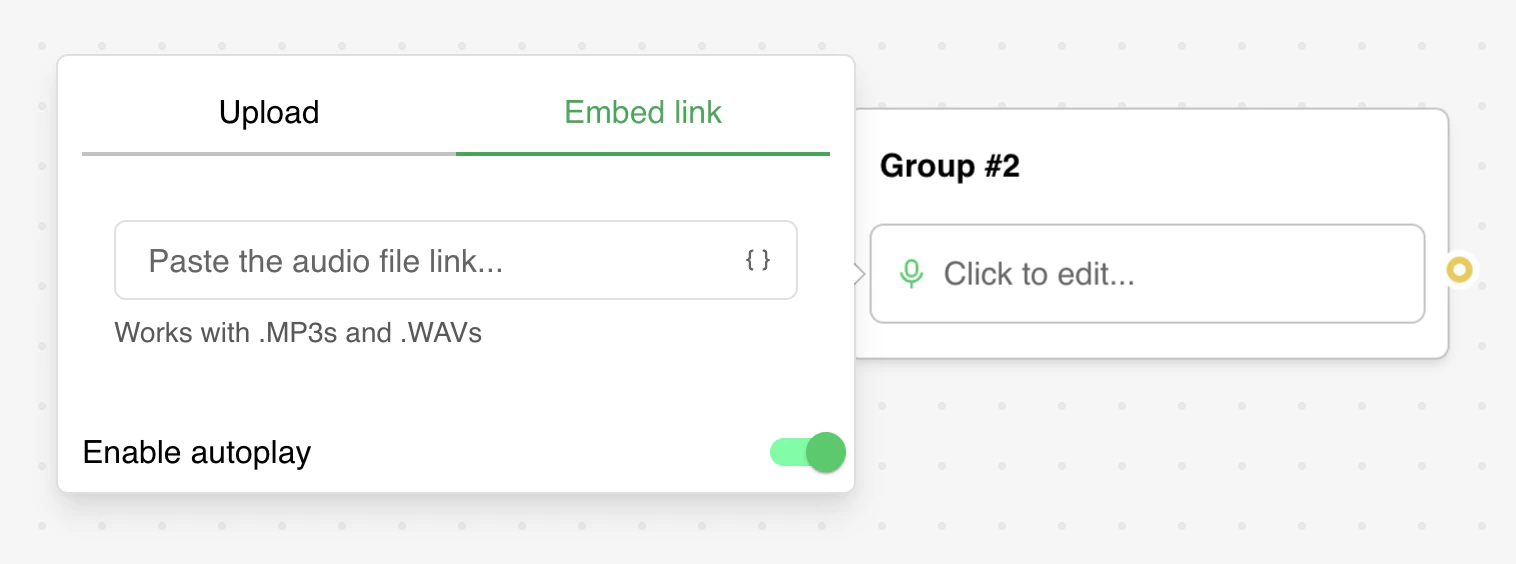
The Audio block provides two methods to add audio content:
* **Upload**: Upload an audio file directly from your device
* **Embed Link**: Provide a direct URL to an audio file hosted elsewhere
### Autoplay Setting
You can enable or disable automatic playback of the audio when the block is displayed. Note that
autoplay behavior is subject to browser policies and user interactions.
## Supported Features
* **Variable Support**: The audio URL can include variables that will be dynamically replaced at
runtime
* **Audio Controls**: Users can play, pause, and control the audio playback
* **Responsive Design**: The audio player adapts to different screen sizes with a maximum width
constraint
## Troubleshooting
### The first audio bubble is not autoplaying
This is expected behavior. Most web browsers have policies that prevent audio from playing
automatically without user interaction. The user needs to interact with the page before audio can be
played automatically.
### The audio is not playing on iOS / Safari
This typically indicates that your audio file is malformed or uses an unsupported format. Depending
on the source of your audio file, ensure the encoding is done correctly. To verify the file
integrity:
1. Download the audio file to your computer
2. Try playing it locally with your system's media player
3. If it doesn't play locally, re-encode the file using standard audio formats (MP3, WAV, OGG)
### Variables not resolving in audio URLs
If you're using variables in your audio URL and they're not being replaced:
1. Ensure the variable exists in your bot's variable list
2. Check that the variable name is spelled correctly
3. Verify the variable has a value assigned before the audio block is reached
 ## Configuration Options
### Audio Source
The Audio block provides two methods to add audio content:
* **Upload**: Upload an audio file directly from your device
* **Embed Link**: Provide a direct URL to an audio file hosted elsewhere
### Autoplay Setting
You can enable or disable automatic playback of the audio when the block is displayed. Note that
autoplay behavior is subject to browser policies and user interactions.
## Supported Features
* **Variable Support**: The audio URL can include variables that will be dynamically replaced at
runtime
* **Audio Controls**: Users can play, pause, and control the audio playback
* **Responsive Design**: The audio player adapts to different screen sizes with a maximum width
constraint
## Troubleshooting
### The first audio bubble is not autoplaying
This is expected behavior. Most web browsers have policies that prevent audio from playing
automatically without user interaction. The user needs to interact with the page before audio can be
played automatically.
### The audio is not playing on iOS / Safari
This typically indicates that your audio file is malformed or uses an unsupported format. Depending
on the source of your audio file, ensure the encoding is done correctly. To verify the file
integrity:
1. Download the audio file to your computer
2. Try playing it locally with your system's media player
3. If it doesn't play locally, re-encode the file using standard audio formats (MP3, WAV, OGG)
### Variables not resolving in audio URLs
If you're using variables in your audio URL and they're not being replaced:
1. Ensure the variable exists in your bot's variable list
2. Check that the variable name is spelled correctly
3. Verify the variable has a value assigned before the audio block is reached
## Configuration Options
### Audio Source
The Audio block provides two methods to add audio content:
* **Upload**: Upload an audio file directly from your device
* **Embed Link**: Provide a direct URL to an audio file hosted elsewhere
### Autoplay Setting
You can enable or disable automatic playback of the audio when the block is displayed. Note that
autoplay behavior is subject to browser policies and user interactions.
## Supported Features
* **Variable Support**: The audio URL can include variables that will be dynamically replaced at
runtime
* **Audio Controls**: Users can play, pause, and control the audio playback
* **Responsive Design**: The audio player adapts to different screen sizes with a maximum width
constraint
## Troubleshooting
### The first audio bubble is not autoplaying
This is expected behavior. Most web browsers have policies that prevent audio from playing
automatically without user interaction. The user needs to interact with the page before audio can be
played automatically.
### The audio is not playing on iOS / Safari
This typically indicates that your audio file is malformed or uses an unsupported format. Depending
on the source of your audio file, ensure the encoding is done correctly. To verify the file
integrity:
1. Download the audio file to your computer
2. Try playing it locally with your system's media player
3. If it doesn't play locally, re-encode the file using standard audio formats (MP3, WAV, OGG)
### Variables not resolving in audio URLs
If you're using variables in your audio URL and they're not being replaced:
1. Ensure the variable exists in your bot's variable list
2. Check that the variable name is spelled correctly
3. Verify the variable has a value assigned before the audio block is reached