> ## Documentation Index
> Fetch the complete documentation index at: https://docs.quick.bot/llms.txt
> Use this file to discover all available pages before exploring further.
# Condition
export const YoutubeVideo = ({id}) =>
;
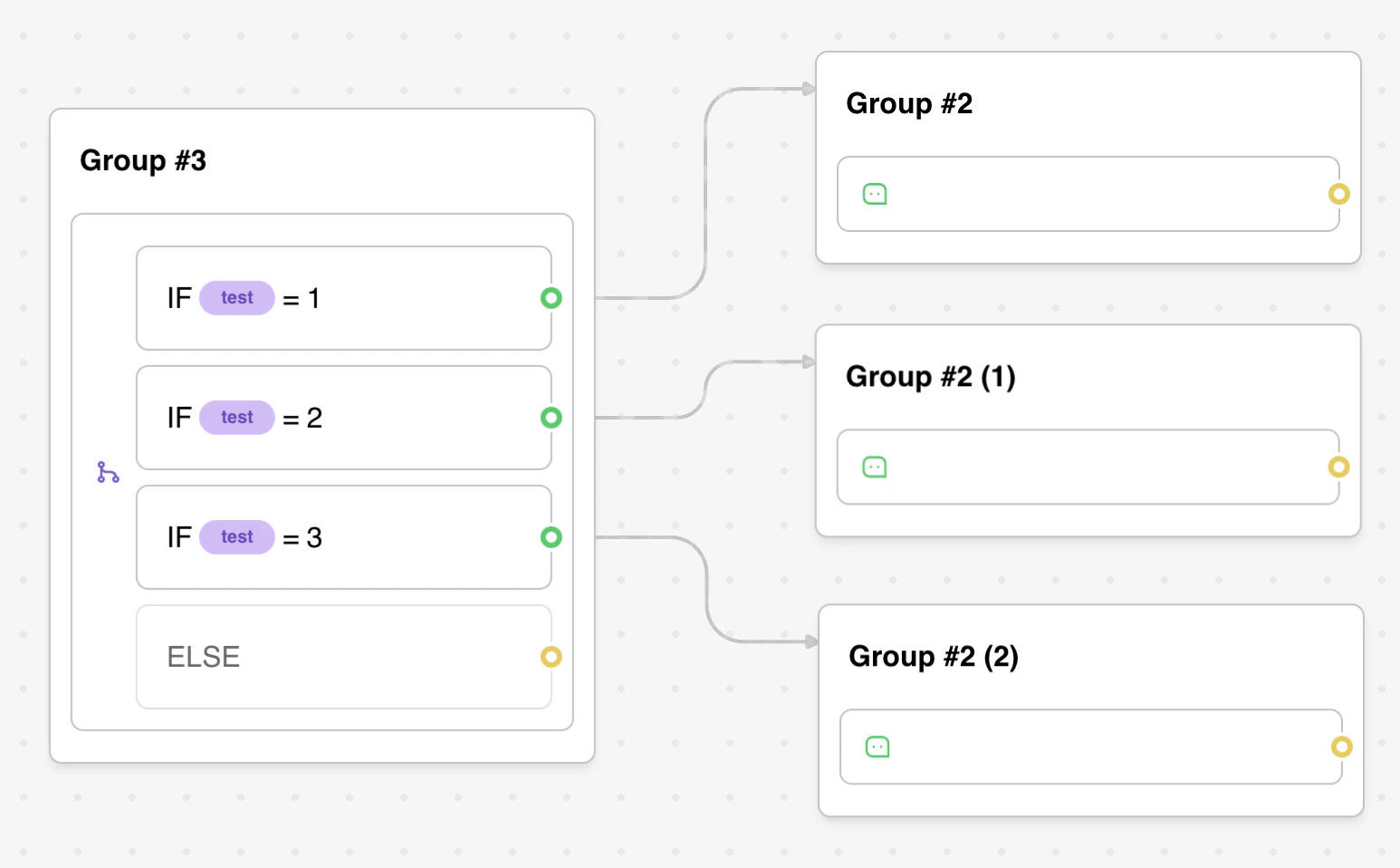
The Condition block allows you to split your conversation flow into two paths based on logical conditions, enabling dynamic and personalized bot experiences.
## Configuration Options
### Comparison Setup
* **Variable Selection**: Choose which bot variable to evaluate
* **Operator Selection**: Select from 12 different comparison operators
* **Value Input**: Specify the comparison value (supports variables)
* **Multiple Conditions**: Add multiple comparisons with logical operators
### Logical Operators
* **AND**: All comparisons must be true for the condition to pass
* **OR**: At least one comparison must be true for the condition to pass
* **Mixed Logic**: Combine multiple comparisons with consistent logical operators
* **Evaluation Order**: Comparisons are evaluated in the order they appear
## Features
### Comprehensive Comparison Operators
The condition block supports 12 different comparison types for maximum flexibility:
#### Text Comparisons
* **Equal to**: Exact string matching (case-sensitive)
* **Not equal**: Inverse of equal comparison
* **Contains**: Checks if variable contains the specified value
* **Does not contain**: Inverse of contains comparison
* **Starts with**: Checks if variable begins with specified value
* **Ends with**: Checks if variable ends with specified value
#### Numeric Comparisons
* **Greater than**: Numeric comparison (greater than or equal to)
* **Less than**: Numeric comparison (less than or equal to)
#### Existence Checks
* **Is set**: Checks if variable has any value (not null, undefined, or empty string)
* **Is empty**: Checks if variable is null, undefined, or empty string
#### Pattern Matching
* **Matches regex**: Advanced pattern matching using regular expressions
* **Does not match regex**: Inverse of regex pattern matching
### Advanced Variable Support
* **Dynamic Values**: Use variables in both sides of comparisons
* **Type Flexibility**: Handles strings, numbers, arrays, and boolean values
* **Nested Conditions**: Complex logical structures with multiple variables
* **Real-time Evaluation**: Conditions are evaluated dynamically during conversation
## Operators
Will match if the provided value is strictly equal to the value.
Will match if the provided value is not equal to the value.
Will match if the provided value contains the value. If a list is provided, it will match if the
list has at least one element in common with the value.
Same as `Contains` but will match the inverse.
Will match if the provided value is greater or equal than the value.
Will match if the provided value is less or equal than the value.
Will match if the provided value is not null or undefined and not an empty string.
Will match if the provided value is null, undefined, or an empty string.
Will match if the provided value starts with the value.
Will match if the provided value ends with the value.
Value should start and end with `/` and contain a valid regex pattern.
Example:
* `/^hello$/` will match if the string is strictly equal to "hello".
* `/hello/` will match if the string contains "hello". Like "hello world".
* `/hello/i` will match if the string contains "hello" case-insensitive. Like "Hello world".
* `/[0-9]+/` will match if the string contains one or more digits. Like "123".
Same as `Matches regex` but will match if the provided value does not match the regex pattern.
## Advanced Features
### Complex Logical Structures
Build sophisticated decision trees with multiple conditions:
```
Example: User Qualification Logic
Condition 1: Score > 80 AND Category = "Premium"
Condition 2: Experience > 5 OR Referral = "Yes"
Combined: (Score > 80 AND Category = "Premium") OR (Experience > 5 OR Referral = "Yes")
```
### Dynamic Condition Values
Use variables in comparison values for maximum flexibility:
```
Dynamic Pricing Example:
- Variable: {{Current Price}}
- Operator: Greater than
- Value: {{Minimum Price Threshold}}
User Segmentation Example:
- Variable: {{User Type}}
- Operator: Contains
- Value: {{Target Segment}}
```
### Array and List Handling
Handle complex data structures with contains operations:
* **Array Variables**: Check if arrays contain specific values
* **Comma-separated Lists**: Search within concatenated strings
* **Multiple Values**: Use contains to match any item in a list
### Regular Expression Power
Advanced pattern matching for complex validation:
```
Email Validation: /^[^\s@]+@[^\s@]+\.[^\s@]+$/
Phone Numbers: /^\+?[\d\s\-\(\)]{10,}$/
Custom Formats: /^[A-Z]{2}\d{4}$/
Case Insensitive: /hello/i
```
## Example Use Cases
### User Segmentation
```
Condition: Premium User Check
- Variable: {{Subscription Type}}
- Operator: Equal to
- Value: "premium"
Result: Route premium users to exclusive content
```
### Dynamic Pricing
```
Condition: Bulk Discount Eligibility
- Variable: {{Order Quantity}}
- Operator: Greater than
- Value: 10
Result: Apply bulk pricing for large orders
```
### Content Personalization
```
Multiple Conditions with AND logic:
1. {{User Region}} equals "North America"
2. {{User Language}} equals "English"
3. {{User Age}} greater than 18
Result: Show region and age-appropriate content
```
### Form Validation
```
Email Format Validation:
- Variable: {{Email Address}}
- Operator: Matches regex
- Value: /^[^\s@]+@[^\s@]+\.[^\s@]+$/
Result: Proceed only with valid email addresses
```
## Troubleshooting
### Common Logic Errors
* **Case Sensitivity**: "Premium" ≠ "premium" - use exact case matching
* **Type Mismatches**: Comparing strings with numbers may not work as expected
* **Empty Variables**: Undefined variables may cause unexpected behavior
* **Operator Confusion**: "Greater than" includes equality, use appropriate operators
### Variable-Related Issues
* **Undefined Variables**: Check that variables exist before comparison
* **Array Handling**: Use "Contains" operator for array values, not "Equal to"
* **Dynamic Values**: Ensure comparison value variables contain expected data
* **Scope Problems**: Variables may not be available in all conversation contexts
### Regex Troubleshooting
* **Syntax Errors**: Validate regex patterns before deployment
* **Escape Characters**: Properly escape special characters in patterns
* **Performance**: Complex regex can slow down condition evaluation
* **Testing**: Use regex testing tools to verify patterns work as expected
### Flow Logic Problems
* **Dead Ends**: Ensure both condition paths lead to meaningful destinations
* **Infinite Loops**: Avoid conditions that could create circular flows
* **Path Coverage**: Test all possible condition outcomes
* **Default Handling**: Provide fallback behavior for edge cases
### Platform-Specific Considerations
* **Mobile Compatibility**: Test conditions across different devices
* **Browser Differences**: Some regex patterns may behave differently
* **Network Issues**: Handle cases where variable updates may be delayed
* **Internationalization**: Consider locale-specific formatting in comparisons
 ## Configuration Options
### Comparison Setup
* **Variable Selection**: Choose which bot variable to evaluate
* **Operator Selection**: Select from 12 different comparison operators
* **Value Input**: Specify the comparison value (supports variables)
* **Multiple Conditions**: Add multiple comparisons with logical operators
### Logical Operators
* **AND**: All comparisons must be true for the condition to pass
* **OR**: At least one comparison must be true for the condition to pass
* **Mixed Logic**: Combine multiple comparisons with consistent logical operators
* **Evaluation Order**: Comparisons are evaluated in the order they appear
## Features
### Comprehensive Comparison Operators
The condition block supports 12 different comparison types for maximum flexibility:
#### Text Comparisons
* **Equal to**: Exact string matching (case-sensitive)
* **Not equal**: Inverse of equal comparison
* **Contains**: Checks if variable contains the specified value
* **Does not contain**: Inverse of contains comparison
* **Starts with**: Checks if variable begins with specified value
* **Ends with**: Checks if variable ends with specified value
#### Numeric Comparisons
* **Greater than**: Numeric comparison (greater than or equal to)
* **Less than**: Numeric comparison (less than or equal to)
#### Existence Checks
* **Is set**: Checks if variable has any value (not null, undefined, or empty string)
* **Is empty**: Checks if variable is null, undefined, or empty string
#### Pattern Matching
* **Matches regex**: Advanced pattern matching using regular expressions
* **Does not match regex**: Inverse of regex pattern matching
### Advanced Variable Support
* **Dynamic Values**: Use variables in both sides of comparisons
* **Type Flexibility**: Handles strings, numbers, arrays, and boolean values
* **Nested Conditions**: Complex logical structures with multiple variables
* **Real-time Evaluation**: Conditions are evaluated dynamically during conversation
## Configuration Options
### Comparison Setup
* **Variable Selection**: Choose which bot variable to evaluate
* **Operator Selection**: Select from 12 different comparison operators
* **Value Input**: Specify the comparison value (supports variables)
* **Multiple Conditions**: Add multiple comparisons with logical operators
### Logical Operators
* **AND**: All comparisons must be true for the condition to pass
* **OR**: At least one comparison must be true for the condition to pass
* **Mixed Logic**: Combine multiple comparisons with consistent logical operators
* **Evaluation Order**: Comparisons are evaluated in the order they appear
## Features
### Comprehensive Comparison Operators
The condition block supports 12 different comparison types for maximum flexibility:
#### Text Comparisons
* **Equal to**: Exact string matching (case-sensitive)
* **Not equal**: Inverse of equal comparison
* **Contains**: Checks if variable contains the specified value
* **Does not contain**: Inverse of contains comparison
* **Starts with**: Checks if variable begins with specified value
* **Ends with**: Checks if variable ends with specified value
#### Numeric Comparisons
* **Greater than**: Numeric comparison (greater than or equal to)
* **Less than**: Numeric comparison (less than or equal to)
#### Existence Checks
* **Is set**: Checks if variable has any value (not null, undefined, or empty string)
* **Is empty**: Checks if variable is null, undefined, or empty string
#### Pattern Matching
* **Matches regex**: Advanced pattern matching using regular expressions
* **Does not match regex**: Inverse of regex pattern matching
### Advanced Variable Support
* **Dynamic Values**: Use variables in both sides of comparisons
* **Type Flexibility**: Handles strings, numbers, arrays, and boolean values
* **Nested Conditions**: Complex logical structures with multiple variables
* **Real-time Evaluation**: Conditions are evaluated dynamically during conversation