

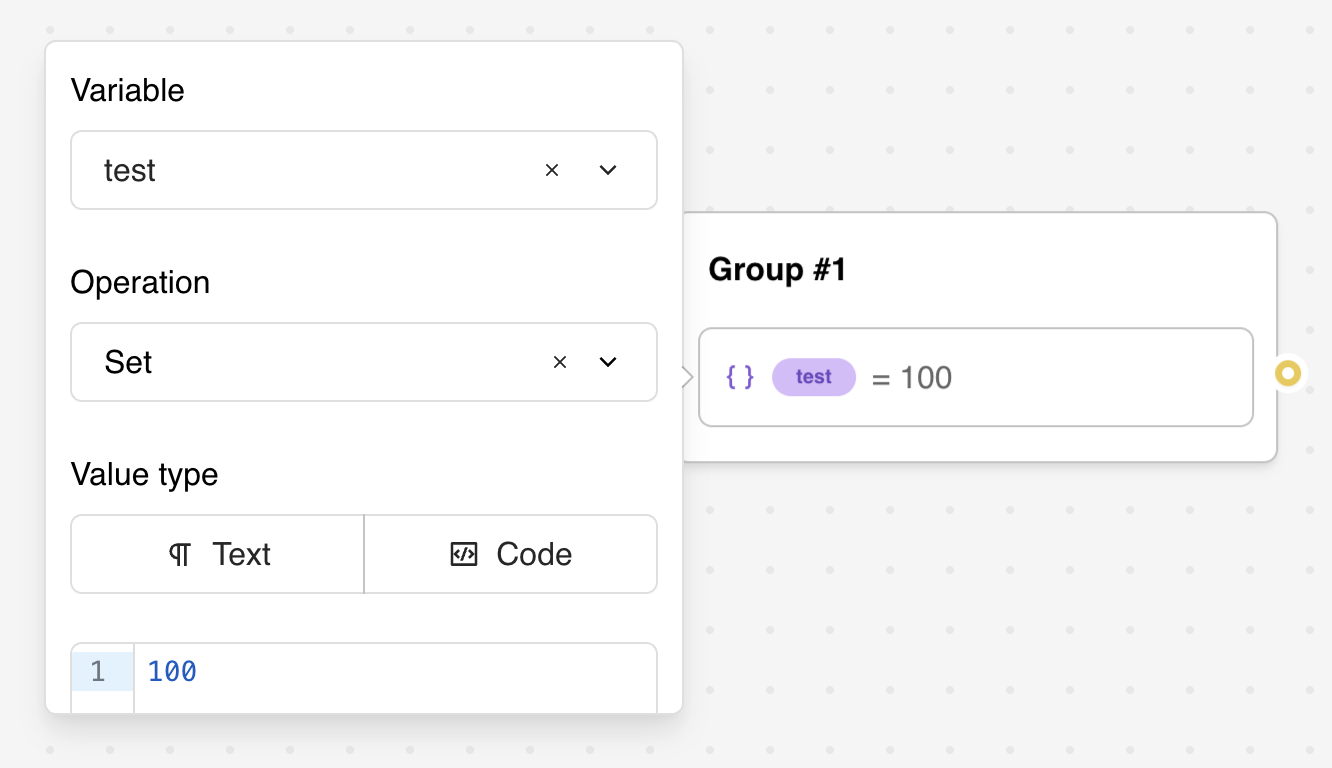
Configuration Options
Variable Selection
The first step is to select which variable you want to work with:- Variable Dropdown: Choose from existing variables in your bot or create a new one
- Automatic Creation: New variables are created on-the-fly if they don’t exist
- System Variables Hidden: System variables (like
{{system_now}}) are not shown in the dropdown for this block
Operation Type
Choose the operation you want to perform on the variable:- Set: Assign a value using text or JavaScript expressions
- Empty: Reset the variable to an undefined state
- Append value(s): Add values to arrays (automatically converts to array if needed)
- Pop: Remove and optionally store the last item from an array
- Shift: Remove and optionally store the first item from an array
- Map item with same index: Cross-reference between two related arrays
Operation-Specific Configuration
Depending on the selected operation type, additional configuration options appear:For “Set” Operation:
- Text/Code Mode Toggle: Switch between simple text input and full JavaScript editor
- Value Input: Enter the value or expression to assign to the variable
For “Pop” and “Shift” Operations:
- Store Item Variable: Optional dropdown to select where to store the removed item
For “Append value(s)” Operation:
- Value to Append: Text input supporting variables to append to the array
For “Map item with same index” Operation:
- Base Item Variable: The item you’re searching for
- Base List Variable: The array containing the base item
- Target List Variable: The array to retrieve the corresponding value from
For “Empty” Operation:
- No additional configuration needed
Set
You can set your variable with any value withSet. It can be any kind of plain text (Text
mode) but also Javascript code (Code mode). Text is text: it is never evaluated. To compute
a value, switch the block to Code mode.
Expressions with existing variables (Code mode)
In Code mode you can apply operations on existing variables. Add a value to your variable:return keyword then it will be automatically prepended to the beginning
of your code.
Text vs Code Mode
When using the Set operation, you can choose between two input modes using the toggle buttons:Text Mode
- Simple text input with variable interpolation
- The text is stored exactly as written, with each
{{variable}}replaced by its value - Never evaluated: dates, prices, coordinates or
{{Score}} + 5stay as plain text - Ideal for concatenation, labels and URLs
Code Mode
- Full JavaScript editor with syntax highlighting
- Required for any calculation, even a simple
{{Score}} + 5 - Access to the complete JavaScript expression engine
- Supports advanced operations like loops, conditionals, and array methods
- If the code fails, the variable is left empty and the error is shown in the preview and in the conversation logs of the inbox
Variables in code are not parsed, they are evaluated. So it should be treated as if it were real Javascript variables.So, if you write
"{{My variable}}", the quotes turn the reference into a plain string (its
internal alias, something like $My_variable), not its value. Remove the quotes to get the variable
content; the editor flags quoted references for you.For example,- ❌
"{{URL base}}/path"=>$URL_base/path - ✅
{{URL base}} + '/path'=>https://my-site.com/path - ✅
`${{{URL base}}}/path`=>https://my-site.com/path
undefined (so ({{Missing}} || []).length is 0).Variables content can either be a string or a list of strings. Check out Valid value
types for more information.
Empty
Resets your variable as if it was never initialized.Append value(s)
A conveniant value that automatically transform your variable into a list of strings. It will append the value(s) to the list. 3 possible cases here:- If the variable is empty, it will create a new array with the provided value(s)
- If the variable is not an array, it will create a new array with the existing value followed by the provided value(s).
- If the variable is an array, it will concatenate the provided value(s) to the existing array.
Pop
Remove and store the last item from an array. This operation:- Removes the last element from the array stored in the selected variable
- Optionally stores the removed item in another variable for later use
- If the variable is not an array, it returns the value as-is
- Select a variable to store the removed item (optional)
Shift
Remove and store the first item from an array. This operation:- Removes the first element from the array stored in the selected variable
- Optionally stores the removed item in another variable for later use
- If the variable is not an array, it returns the value as-is
- Select a variable to store the removed item (optional)
Map item with same index
This operation allows you to cross-reference between two related arrays by finding an item in one array and retrieving the corresponding item at the same index from another array. Use Case: When pulling data from external services, you often have two related lists - one with human-readable labels displayed to users, and another with IDs used for API requests. Configuration: The block requires three variable selections:- Base Item Variable: The specific item you’re looking for (e.g., selected label)
- Base List Variable: The array containing the base item (e.g., array of labels)
- Target List Variable: The array to retrieve the corresponding item from (e.g., array of IDs)
- Find the index of the base item in the base list
- Return the item at that same index from the target list
Advanced Features
JavaScript Expression Engine
The Custom value type provides a full JavaScript expression engine:Dynamic Array Management
Sophisticated array handling for complex data structures:Context-Aware Variable Setting
Smart variable management based on conversation context:- Session Variables: Temporary data that expires with the conversation
- Persistent Variables: Data saved to results table for long-term storage
- Linked Variables: Variables connected to user blocks for automatic updates
- Computed Variables: Variables that depend on other variables and update automatically
Example Use Cases
E-commerce Cart Management
User Personalization
Survey Response Processing
Dynamic Content Selection
Troubleshooting
Common Variable Issues
- Undefined Variables: Check that variables are created before use
- Type Conflicts: Ensure consistent data types (string vs number vs array)
- Scope Problems: Verify variables are accessible in their usage context
- Naming Conflicts: Avoid duplicate variable names that could cause confusion
JavaScript Expression Errors
- Syntax Errors: Validate JavaScript syntax before deployment
- Variable References: Use
{{Variable Name}}syntax correctly - Return Statements: Remember that expressions auto-prepend
returnif not present - Null Handling: Check for null/undefined values before operations
Array Operation Problems
- Empty Arrays: Handle cases where arrays might be empty
- Index Errors: Verify array indices exist before accessing
- Type Mixing: Ensure array elements are compatible types
- Memory Usage: Be mindful of large arrays in browser memory
Integration Challenges
- External APIs: Handle API failures and timeout scenarios gracefully
- Data Format: Ensure data formats match expected patterns
- Session Management: Handle session expiration and variable persistence
- Cross-platform: Test variable behavior across web and WhatsApp environments